Skip to content

How to schedule an in-person exam appointment

If instructors choose to use the Testing Center, this decision should be stated in the class syllabus. If you are unsure whether your instructor uses the Testing Center, please obtain clarification well in advance of your first exam.


Start times for exams should match the in-class administration of the exam. Exceptions will only be made for accommodation-related time adjustments and must be approved by the instructor. 

Before scheduling an appointment, please make sure to read our Policies and Procedures page at the following link  https://testingcenter.duke.edu/policies/.

📝 Scheduling Your Exam Appointment: A Simple 5-Step Guide

Click the Accommodate Login Button below to access Accommodate and start scheduling your appointment.


Step One

  1.  
  2. Select “Testing Room” from the menu on the left-hand side, then click, “New Booking Request” button located in the lower left corner of the screen.

  3.  
  4. This step is required whether you have approved accommodations or not.

  1. Step Two 

  2.  

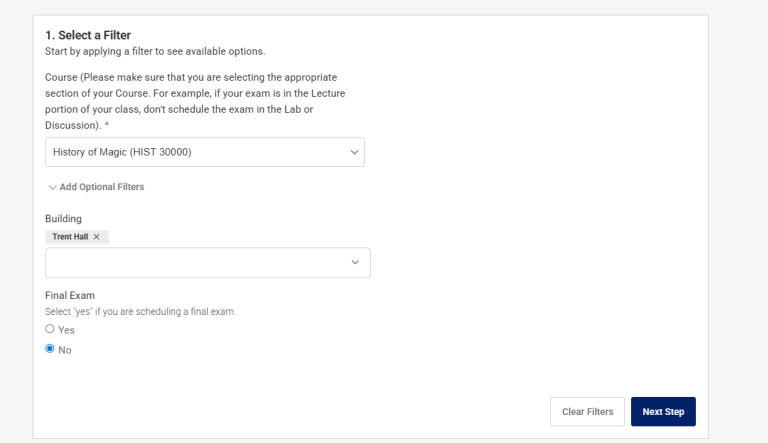
Click the arrow in the “Course” drop-down menu and choose the class you would like to schedule an exam for.


Under the optional filters, select Trent Hall as the location and indicate whether the appointment is for a final exam.

Step Three


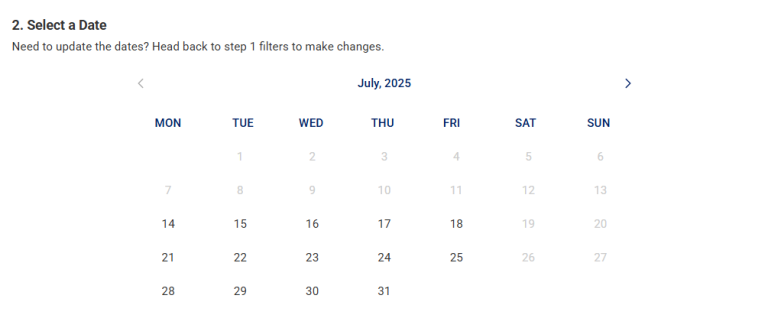
📆 Click “Next Step.” to open the calendar view and select the date you want to take your exam.

Step Four-Room Selection


Select your exam room, time slot, and amount of time allowed for the exam.


If you have an approved accommodation for a private room, select it now.  Otherwise, you can choose from available spaces such as Room ‘J’, Room ‘H’, or other designated exam rooms.


🕒 Important:
Make sure the exam time you select matches your class’s scheduled exam time—unless you have been granted alternate approval.

Step Five

Click ‘Next Step


Complete each box and review each section, ensuring that all your details are accurate and complete.


✅ Then, check the box to agree to the Integrity Agreement and Testing Center Policy, and click “Submit.”


Note:

Once your exam has been uploaded, the Testing Center staff will make any necessary adjustments to the exam duration, including those related to approved accommodations.